
Embedding the Consumer Portal
Sparrow’s consumer portal (/portal) lets each consumer manage their own
webhooks, subscriptions, and deliveries with a scoped, expiring portal
token instead of the admin API key. This guide shows the recommended way to
serve it to external users while Sparrow itself stays VPN-only: your
product’s public app acts as a forwarding proxy for exactly the routes the
portal needs — nothing else.
The result: the visitor’s browser only ever talks to your domain, Sparrow is never directly reachable from the internet, and the only credential in the browser is a token that can touch one consumer and nothing more.
How it works, end to end
Section titled “How it works, end to end”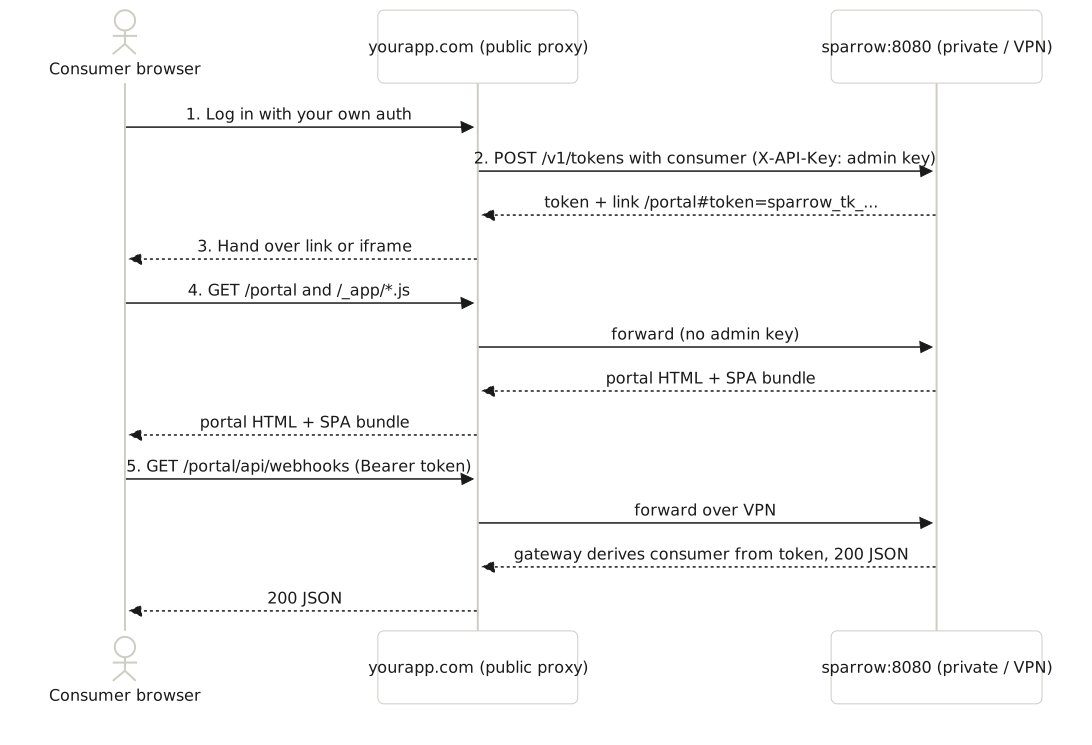
-
Your app authenticates the user with whatever login it already has. Sparrow plays no part in identity — it never needs user accounts.
-
Your backend mints a token over the private network:
Terminal window curl -s -X POST http://sparrow:8080/v1/tokens \-H "X-API-Key: $SPARROW_API_KEY" -H "Content-Type: application/json" \-d '{"name": "portal", "consumer": "acme", "ttl_seconds": 3600, "external_id": "user-42"}'# → { "token": { "id": "tok_...", "expires_at": "...", ... }, "secret": "sparrow_tk_...",# "reused": false, "portal_path": "/portal#token=sparrow_tk_...&consumer=acme&expires=..." }This is the only call that uses the admin key, and it happens server-to-server — the key never crosses the network boundary. The link is a consumer-scoped access token (the same kind
sparrow tokens create --consumermakes): pick a shortttl_seconds(the default is 7 days), and revoke it early withDELETE /v1/tokens/{id}.external_idis your id for who the link is for (your user id, say). There is at most one active token per consumer andexternal_id, which makes the call safe to repeat on every page view: while that user’s link is valid, Sparrow returns the same token ("reused": true) instead of minting another, and mints a fresh one once it has expired or been revoked. -
Your app hands the link to the browser — redirect to
https://yourapp.com/portal#token=..., or render it in an<iframe>(the portal’s headers permit framing; the rest of Sparrow forbids it). The token rides in the URL fragment, which browsers never send in HTTP requests — it stays out of your proxy’s and Sparrow’s access logs. -
The browser loads the portal through your proxy. The HTML and JS bundle come from Sparrow via the forwarded routes. Portal HTML is served without the admin API key (neither the portal nor the dashboard receives it).
-
The portal calls the API through the same proxy, under the single
/portal/api/prefix, sendingAuthorization: Bearer <token>on every request. Sparrow’s portal gateway looks the token up (by its SHA-256 hash, cached for 30 seconds), checks it is active, derives the consumer from the token (never the URL), and maps/portal/api/<rest>to that consumer’s real route — so cross-consumer access is structurally impossible, and event injection and token minting are refused. No token, bad token, or a denied action is a 401/403.
What “forwarding” actually means
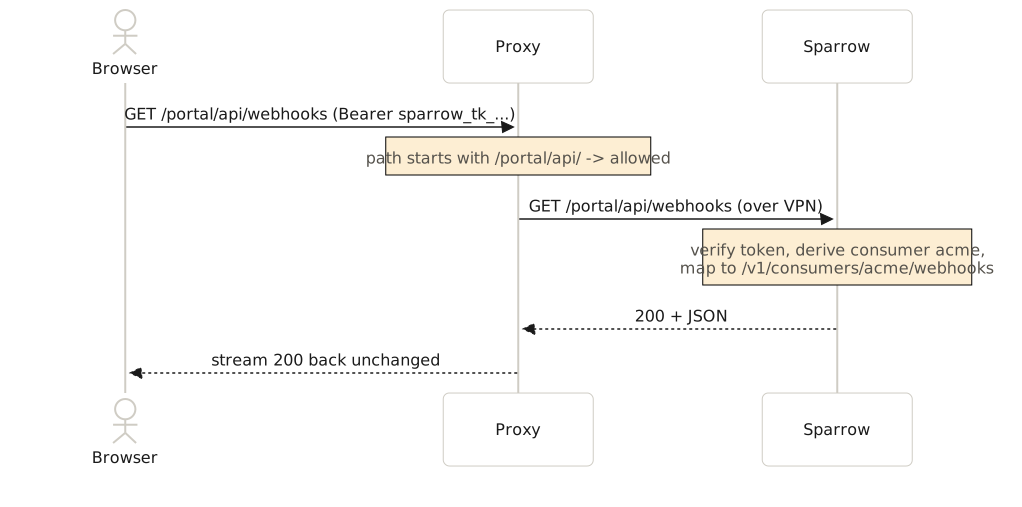
Section titled “What “forwarding” actually means”The proxy is not copying files or caching pages — it is an ordinary program (nginx, Caddy, or your own backend) that sits on a machine with a foot in both networks: the internet can reach it, and it can reach Sparrow over the VPN/private network. For every incoming request it does four things:
- Match the path against the allowlist below. No match → respond 404 itself; Sparrow is never contacted.
- Open its own connection to
sparrow:8080over the private network. - Replay the request — same method, same path, same headers (including
the
Authorization: Bearertoken), same body. - Stream Sparrow’s response back to the browser unchanged.
Trace one real request through it:
The browser never learns Sparrow’s address, never joins the VPN, and never
holds anything but the scoped token. To the browser the portal simply is
hooks.yourapp.com. And because HTML, JS, and API all arrive from that one
origin, no CORS configuration is needed anywhere.
Prerequisites
Section titled “Prerequisites”- A machine (or container) that is publicly reachable and can open TCP connections to Sparrow on the private network — typically your existing app server or ingress, since it already sits in both worlds.
- A DNS name for it (
hooks.yourapp.com) with a TLS certificate — Caddy below provisions one automatically. - Sparrow reachable from that machine as
sparrow:8080(substitute your real host/IP), withSPARROW_API_KEY,SPARROW_ENCRYPTION_KEYS, andSPARROW_ENCRYPTION_PRIMARY_KEY_IDset.
The route allowlist
Section titled “The route allowlist”Forward exactly these three prefixes, deny everything else:
| Route | Why the portal needs it |
|---|---|
GET /portal | the portal page itself |
GET /_app/* | SPA JS/CSS bundle |
* /portal/api/* | every portal API call — webhooks, subscriptions, deliveries, retries, and the read-only catalog/template helpers, all bearer-scoped to the token’s consumer |
GET /favicon.png | tab icon (optional) |
That single /portal/api/* prefix replaces every per-consumer and per-helper
/v1 rule. You need no deny rules: the portal gateway derives the consumer
from the token, and refuses event injection itself. Token minting
(POST /v1/tokens), event injection, the
admin dashboard (/), the global /v1 API, /docs, and /openapi.* are
simply never forwarded, so they stay unreachable from the internet.
Paths must be preserved verbatim: the portal page, its API prefix, and its
assets are root-absolute (/portal, /portal/api, /_app), so the portal
cannot be remounted under /integrations/webhooks/. If those roots collide
with your app’s own routes, put the proxy on a dedicated subdomain
(hooks.yourapp.com).
Example: Caddy (simplest — start here)
Section titled “Example: Caddy (simplest — start here)”Caddy provisions the TLS certificate itself, so
the entire public vhost is one Caddyfile block:
hooks.yourapp.com {  # No deny rules needed — the portal gateway scopes and refuses on its own.  @portal path /portal /portal/api/* /_app/* /favicon.png  reverse_proxy @portal sparrow:8080
  respond 404   # everything else}
Run caddy run --config Caddyfile on the dual-homed machine and the portal
is live at https://hooks.yourapp.com/portal#token=....
Example: nginx
Section titled “Example: nginx”# hooks.yourapp.com — public vhost, forwards only the portal slice.server { listen 443 ssl; server_name hooks.yourapp.com; # ... ssl_certificate, etc.
# Rate-limit the API slice (Sparrow does not rate-limit itself). limit_req_zone $binary_remote_addr zone=portal:10m rate=20r/s;
location = /portal { proxy_pass http://sparrow:8080; } location /_app/ { proxy_pass http://sparrow:8080; } location = /favicon.png { proxy_pass http://sparrow:8080; }
# Every portal API call, bearer-scoped by the gateway. No deny rules # needed — the gateway refuses minting/injection and cross-consumer itself. location /portal/api/ { limit_req zone=portal burst=40 nodelay; proxy_pass http://sparrow:8080; }
location / { return 404; }}Never add proxy_set_header X-API-Key ... in this vhost — a valid admin key
outranks portal token scoping, so injecting it would silently make every
portal visitor an admin.
Example: Express (your app’s backend as the proxy)
Section titled “Example: Express (your app’s backend as the proxy)”If you’d rather not run a separate vhost, a few lines in your existing Node backend do the same job:
import { createProxyMiddleware } from "http-proxy-middleware";
const SPARROW = "http://sparrow:8080"; // reachable over the VPN only
const portalSlice = ["/portal", "/portal/api", "/_app", "/favicon.png"];
// No deny middleware needed: the gateway derives the consumer from the token// and refuses minting, event injection, and cross-consumer access itself.app.use(portalSlice, createProxyMiddleware({ target: SPARROW, changeOrigin: true }));
// Minting stays server-side, behind YOUR auth:app.post("/api/webhook-portal-link", requireLogin, async (req, res) => {  const consumer = req.user.tenantId; // however you map users → consumers  const r = await fetch(`${SPARROW}/v1/tokens`, {    method: "POST",    headers: { "X-API-Key": process.env.SPARROW_API_KEY, "Content-Type": "application/json" },    // external_id: the same user gets the same link back while it is valid.    body: JSON.stringify({ name: "portal", consumer, ttl_seconds: 3600, external_id: req.user.id }),  });  const { portal_path } = await r.json();  res.json({ url: portal_path }); // same-origin: /portal#token=...});
Then link or iframe url from your UI. Because everything is same-origin,
no CORS_ALLOWED_ORIGINS configuration is needed.
Security analysis
Section titled “Security analysis”What each party can and cannot do:
| Actor | Can | Cannot |
|---|---|---|
Portal visitor with a valid token for acme | Manage acme’s webhooks/subscriptions, view and retry acme’s deliveries | Read any other consumer, inject events, mint tokens, reach the admin UI/API |
| Anyone hitting the public vhost without a token | Load the portal shell (renders “missing access link”) | Call any API route — everything under /portal/api returns 401 |
| Someone who steals a portal link | Everything the legitimate holder can, until it expires or you revoke it | Escalate beyond that consumer |
| Your backend | Mint tokens for any consumer (it holds the admin key) | — (it is fully trusted; keep the key server-side) |
Why the pieces hold:
- Token integrity — a portal token is 256 random bits; Sparrow stores
only its SHA-256 hash, together with the consumer and expiry. The
consumerandexpiresin the link fragment are for display only — editing them changes nothing the server enforces. - Scope is enforced by Sparrow, not the proxy. The consumer comes from
the stored token, never the URL, so the portal gateway maps every
/portal/apicall to that consumer’s own route and refuses minting and event injection — the proxy needs no deny rules and cross-consumer access is impossible even if the whole prefix is forwarded. - No admin key in the browser, ever. Portal HTML omits the config
injection the admin dashboard relies on, and the mint call is
server-to-server. The single fatal misconfiguration is a proxy that
injects
X-API-Keyon forwarded portal routes — never do that. - Fragment tokens don’t leak into logs.
#token=...is never sent in HTTP requests; the portal moves it tosessionStorageand sends it only as anAuthorizationheader over TLS. - Blast radius of a leaked link is bounded by consumer + TTL, and you
can cut it short: revoke the link’s token id and it stops working
within 30 seconds on every instance. With
external_id, each of your users holds at most one live link per consumer; expired and revoked links are deleted from the database a week later by a daily purge. - Reusable links are stored encrypted. To hand the same link back,
Sparrow keeps the secret of a token minted with an
external_id, envelope-encrypted withSPARROW_ENCRYPTION_KEYSlike webhook secrets. Tokens minted without one are stored as a SHA-256 hash only. Revoking a token deletes its stored secret.
Checklist before going live:
-
SPARROW_API_KEYset — with an empty key Sparrow’s auth middleware is disabled and the forwarded slice would be wide open. -
SPARROW_ENCRYPTION_KEYSandSPARROW_ENCRYPTION_PRIMARY_KEY_IDconfigured and stored in a secret manager. - Proxy forwards only the allowlist; default route denies.
- No
X-API-Keyinjection anywhere on the public vhost. - Short
ttl_seconds(e.g. 3600; the default is 7 days), minted behind your login withexternal_idset to your user id; revoke a link’s token when the user logs out or loses access. - TLS terminated at the proxy; rate limiting on
/portal/api/.
Alternative: no Sparrow UI at all
Section titled “Alternative: no Sparrow UI at all”If you want full brand control, skip the portal UI and build your own screens: your backend keeps the token (or admin key) server-side, calls the consumer-scoped REST API over the VPN, and renders native components. The OpenAPI spec and generated clients make this mechanical — the portal is a convenience, the API is the contract.